|
Conjoin Multiple Elements |
  
|
|
Conjoin Multiple Elements |
|
Sometimes you may need to conjoin multiple elements into one. ForeUI provides two approaches to achieve this: grouping and embedding.
Grouping
Grouping elements is very easy, just select them together and click the  button in the floating tool pane, then the elements will be conjoined into a single Group element.
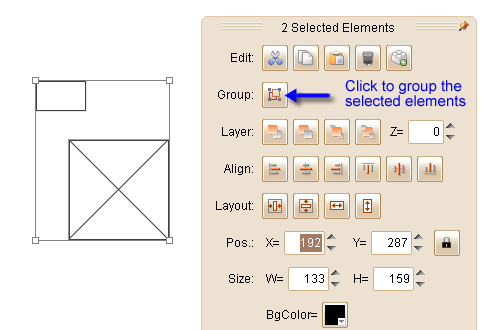
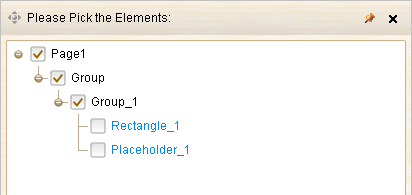
The member elements within the group are even and they all belongs to the Group element.
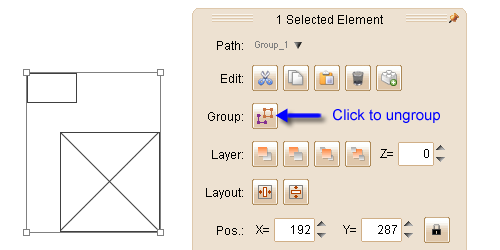
You can ungroup them by clicking the  button:
Embedding
Some elements can work as containers and they allow you to embed other elements into them. Actually the Group element is a special type of container: all group members are "embedded" into the group.
These elements can be used as containers, and they can embed each other, with multiple levels.
| • | Group |
| • | Table |
| • | Scrollable Container |
| • | Tabs |
| • | Vertical Tabs |
| • | Tree |
| • | Window |
| • | Accordion |
If you embed element A into B, then embed B into C, you will get a nested structure.
Remarks: The elements above (except the Group) will auto create a group to wrap its embedded elements.
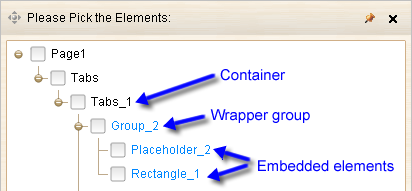
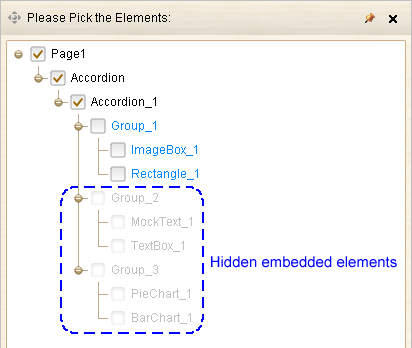
Some containers have the ability to show/hide part of its embedded elements, such as:
| • | Tabs & Vertical Tabs: will hide the embedded elements in non-active tabs. |
| • | Tree: will hide the embedded elements in collapsed nodes. |
| • | Accordion: will hide the embedded elements in collapsed sections. |