PayPal Checkout Process
Once you click the "Buy Now" button, the PayPal checkout page will pop up. The figure below shows a screen shot:
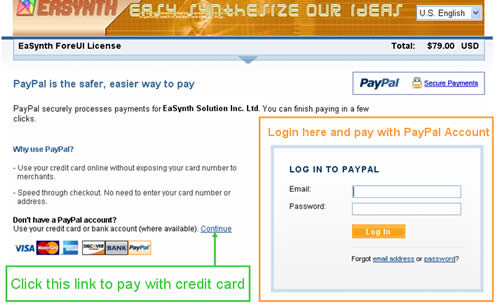
If you already have a PayPal account, you can login on the right region and pay with your PayPal account directly.
If you do not have PayPal account (and not willing to register one), you can click the "Continue" link on the page to pay with your credit card or bank account (marked with green color in the figure). After clicking the link, you will see the next page like this:
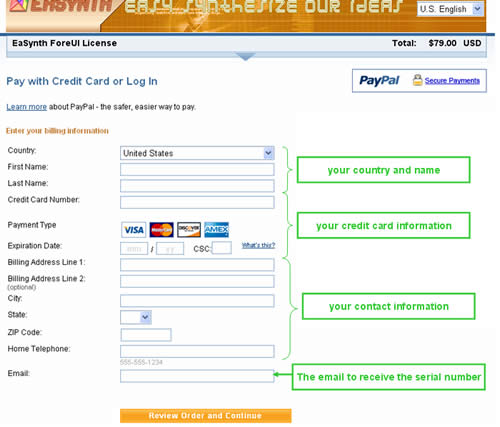
You can input the required information and click the "Review Order and Continue" button here, the payment will be performed after your confirmation.
Remarks:
Paying without PayPal account may not be supported in certain countries, PayPal website will detect your country by your IP address. In this case, you have two options:
- Use proxy (which is located at other country) to access PayPal. Since the exchanging data is ciphered in SSL, using proxy will not bring the security issue.
- Just take a minute to register a PayPal account, it is free.