
My previous two posts (this and this) are about the new features that will be available in V3.0. Today I will continue the forecast. I would like to introduce another exciting feature of ForeUI V3.0: toolbar in simulation.
From V3.0, your generated DHTML simulation can have an optional toolbar, which provides the page navigation and property viewing features. When you launch the simulation in web browser, the toolbar looks like this:
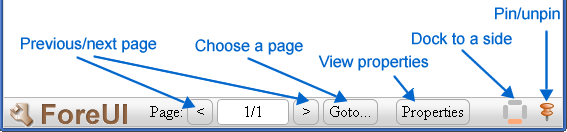
The toolbar can be docked to any side of the screen. You can choose the dock side on the right of the toolbar. You can also pin/unpin the toolbar, the unpinned toolbar will be hidden automatically if you don’t manipulate on it for a while.
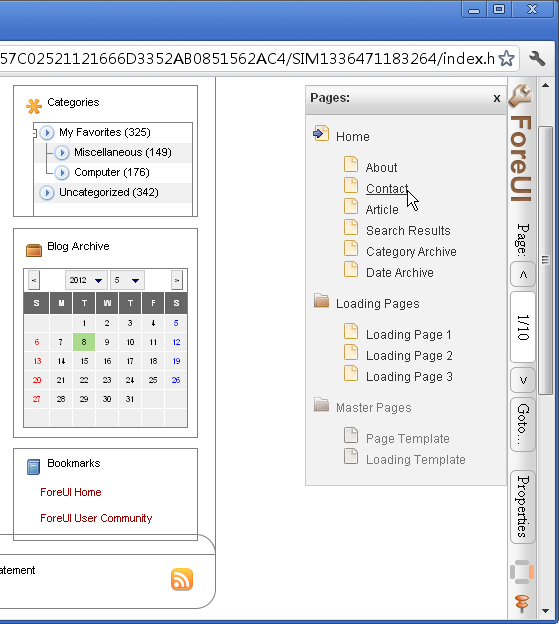
Clicking the “<” and “>” buttons can navigate to previous or next page in your prototype, you can do so by pressing PageUp and pageDown as well (this has been supported in V2.x). The “Goto…” button can show you all the pages in your prototype and you can choose one to switch to:
When you click the “Properties” button, the property view will be shown on the screen, and you can watch all properties (including system properties and custom properties) in your prototype:
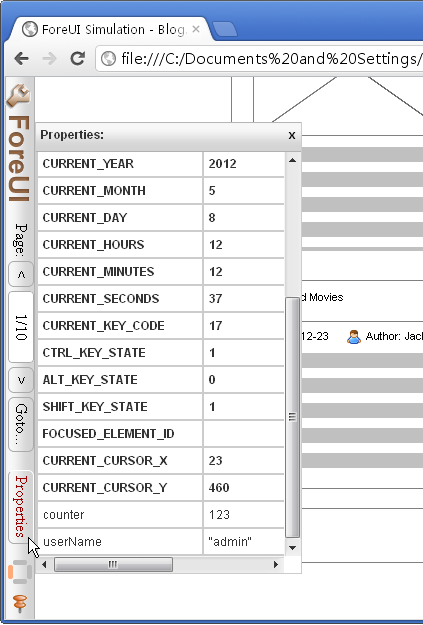
The properties in bold font is the system properties and those with normal font is the custom properties. This property view is dynamic, the values in the view will be updated as soon as the property value is changed.
This is the toolbar you will see in the V3.0, and it is just a beginning, we will keep adding new features into the toolbar in the subsequent versions.