
ForeUI 3.0 RC version is just released. As the last version before V3.0 official release, this version tend to be stable and offer much better experience. We don’t plan to add new feature in the official release of 3.0, instead we will include the completed document and have some bugs fixed.
We have made so many improvements in this version that I could not introduce them one by one. A full list of new features, enhancements and bug fixings can be found here. In this blog post, I would like to show you the most interesting part of this update.
ForeUI Store
From this version, ForeUI integrates with its new online resource store. You can download new element, library or plot file from store window, or from the store web site. You will be able to download new UI theme and ForeUI plugins from the same site in the future.
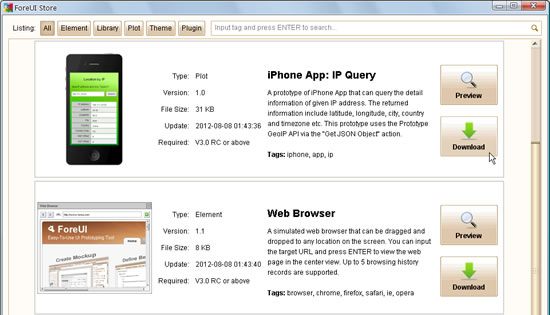
Clicking the category buttons on top can filter the items to be listed. You can also search the item by tag via the search box on top right corner. If you click the “Preview” button, the HTML 5 simulation of the item will be launched in your web browser, and you can see how it works. Clicking on the “Download” button will download the item and deploy it (if needed).
The store is just online and there is not so much resource inside yet. We will frequently add new resources into the store site.
Drag and Drop in Outline View
The outline view is significantly improved by supporting drag and drop elements directly. This is an easy way to embed element into container, or move embedded element from one container to another.
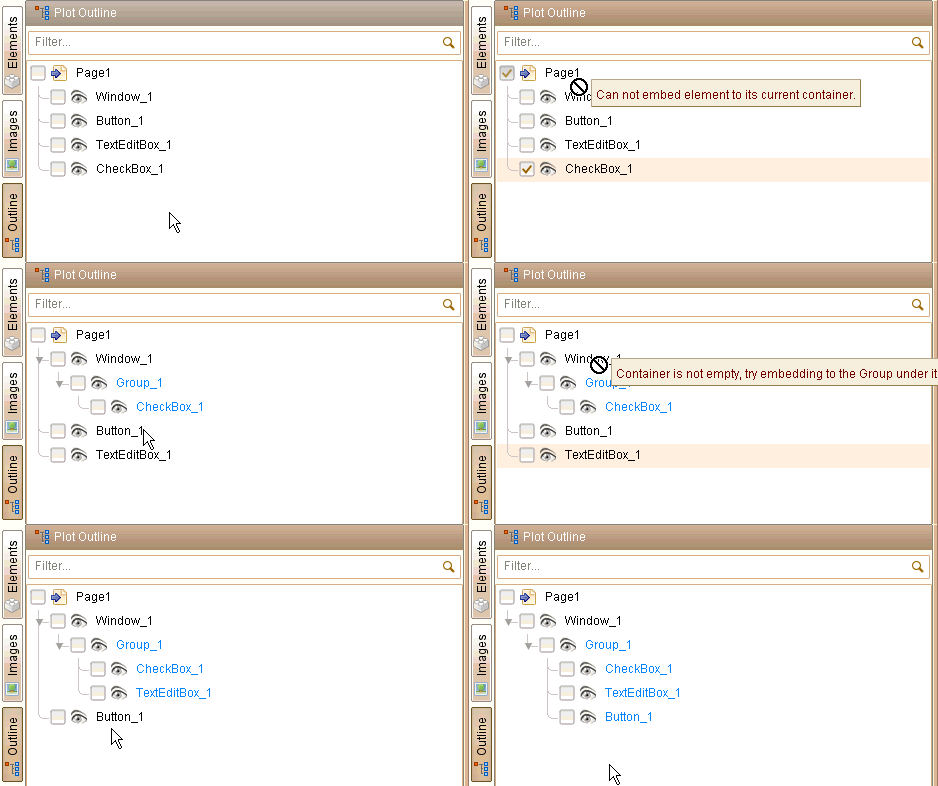
When you drag an element and try to drop it into a container, the tool-tip will tell you if it is allowed. So you will know what you can do and what you can’t, also you will know why. This feature is extremely useful when you want to manage a lot of overlapped elements.
Other New Stuffs
There are many other new things in this version. Don’t be surprised if you find something different than they used to be. Ususally they are changed in a better way, but if you think they are not, please feel free to tell us.
If you are interested in what we exactly did in this version, please check out the update history page.