
Hi everyone, new version again :-)   This release bring us a new “Scrollable Container” element which can make things scrollable.  Also there are more new features and enhancement, please read on.

Scrollable Container

ForeUI provides the scrollbar element from the first version, however the scrollbar is not interactive and you could not really scroll content.  From V1.90 the table element supports content scrolling, and the table can be used as a container from V2.22, thus you can use the table element as a scrollable container, however the table element does not support vertical scrolling yet.  So we implement a new scrollable container element in this version, which allow you to make any element scrollable.
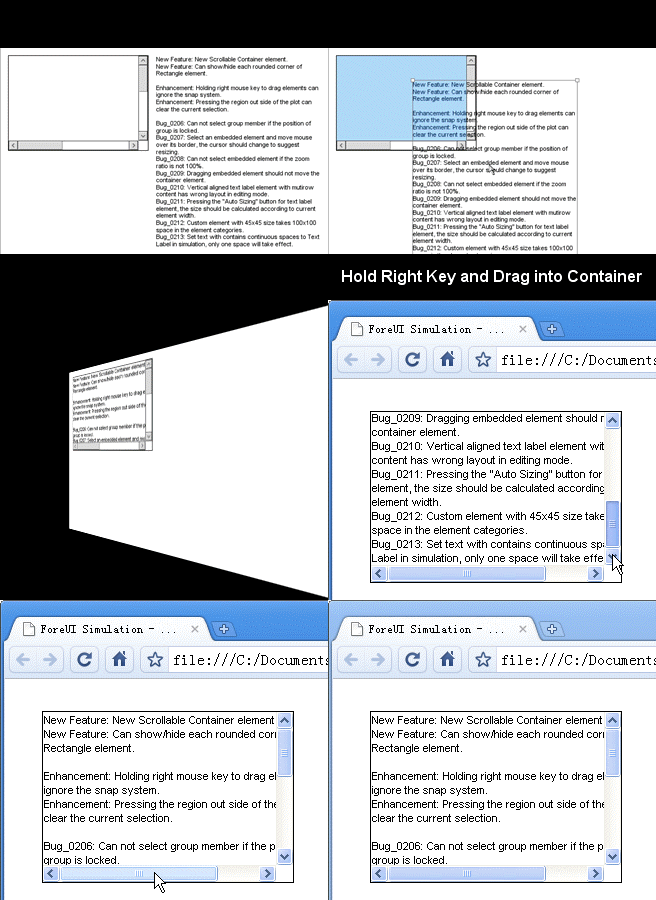
Just like the table element, you can hold the right key and drag element into the scrollable container.  Please remark that only one element can be embedded into the scrollable container, if you want to make complex content scrollable, you can group the content together and then add the group into the container.

Rounded Corners for Rectangle

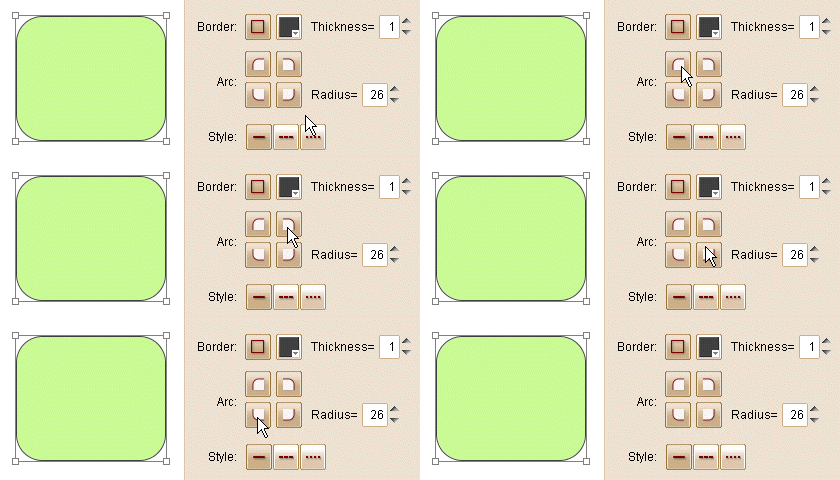
The rectangle element supports rounded corner from V1.45.  From this new version, you can show/hide each rounded corner of the rectangle, like this:
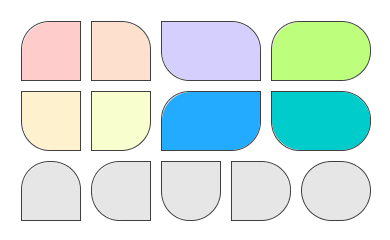
It seems like a small feature but it is really useful, as you can create more new shapes now:
New Example Plot: Fwitter

From this version we include a new example plot named “Fwitter”.  It is a complex, high-fidelity prototype which simulate the UI and behavior of Twitter.  You can sign up, sign in, browse, search or even “post” new content.  This example is so big that will take some time for loading if you like to preview it online.  So it is recommanded to download and run it locally, you can find it in the community site.  This example is also included in the latest install package.

Other Enhancements:

  • Holding right mouse key to drag elements can ignore the snapping system.
  • Pressing the region out side of the plot can clear the current selection.

Fixed Bugs:

  • Bug_0206: Can not select group member if the position of group is locked.
  • Bug_0207: Select an embedded element and move mouse over its border, the cursor should change to suggest resizing.
  • Bug_0208: Can not select embedded element if the zoom ratio is not 100%.
  • Bug_0209: Dragging embedded element should not move the container element.
  • Bug_0210: Vertical aligned text label element with mutirow content has wrong layout in editing mode.
  • Bug_0211: Pressing the “Auto Sizing” button for text label element, the size should be calculated according to current element width.
  • Bug_0212: Custom element with 45×45 size takes 100×100 space in the element categories.
  • Bug_0213: Set text with contains continuous spaces to Text Label in simulation, only one space will take effect.

7 Responses to “ForeUI V2.32: Scrollable Container and More”

  • JWhitling:

    I’ve owned ForeUI for some time now and the one thing that keep s from using it (I use Delphi, etc RAD tools for prototyping now) is the Tab tools, which require so much “coding” that it’s much easier to just use a real development tool. I would hope that you would take a second look at that method in ForeUI and make it work like other programs do, which requires no coding for visual mockups.

    Thanks for listening.

  • Hi JWhitling, thanks for sharing your thought with us.

    Actually we are working on this way, we try to find out the way to create mockup easily. As I mentioned in this thread, we will enhance the Tabs element as a real container, which allows you to embed content for each tab, and you can switch content in the simulation. That will be a perfect way to use Tabs without “coding”.

    The “container” concept is introduced from V2.22, and the Table element is the first one to support it. Now we have the second one: the Scrollable Container. These container elements have rich interaction without coding, you can see we are working in the correct direction, the Tabs and Tree elements will become container sooner or later. Please give us some time to implement it :-)

  • JWhitling:

    Thanks! I’m anxious for my guys to start using this when it becomes available.

  • When I drop a text box into the scrollable container, it gets simulated with transparent text, no matter what I do to the controls. The only way I can get the text to show up is to make the background opaque, and then place the entire scrollable panel on top of a black rectangle.

    I’m running Windows7 Home Premium.

    Thanks,
    - Paul

  • Hi paulsam, the scrollable container should be opaque, otherwise its content (including the text inside and the scrollbars) will be transparent. You can make the scrollable container to have the same background color with the plot background.

  • Sorry, but as I wrote, “it gets simulated with transparent text, no matter what I do to the controls” – meaning that I set the scrollable container to full opacity, and the text is still transparent. And it makes no difference if I set the text box to have full opacity also. Perhaps there is an imcompatibility between the JVM and my graphics card (running on a Gateway notebook that was initially built with XP – my card doesn’t meed WDDM standard.)

    - Paul

  • I could not reproduce the issue you mentioned. Maybe it is caused by some imcompatibility. Can you try it on another machine?

Leave a Reply

*
To prove you're a person (not a spam script), type the answer to the math equation shown in the picture. Click on the picture to hear an audio file of the equation.
Click to hear an audio file of the anti-spam equation