Archive for February, 2010
As the first update after the long leave, this version includes 14 bug fixings. Although no new feature is provided, the following news is still exciting: A brand new ForeUI document is available!
New Online Document
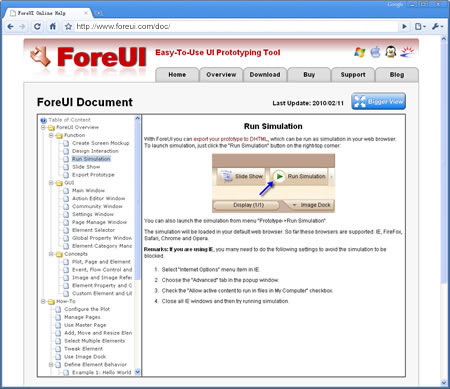
As usual you can launch the document via the menu “Help->Online Help Content”, that will bring you to the ForeUI document page. But you will see the content of the page has been changed completely. The new document introduce all things about ForeUI systematically. No matter you are beginner or advanced user, you will find the document very helpful.
Bug Fixings
14 bugs have been fixed in this update.
- Bug_0146: If a folder is nested under a page, it can not be removed. (Thank r10k for the reporting)
- Bug_0147: There is a delay when start drag selecting. (Thank r10k for the reporting)
- Bug_0148: The height of Calendar header is significantly reduced in simulation if the calendar is big. (Thank Remco Douma for the reporting)
- Bug_0149: Double-click the image in group can not change its image source.
- Bug_0150: Group member A covers B, B may be hidden if A is set to invisible in simulation.
- Bug_0151: Can not get the specific cell value of table in simulation. (Thank Justin for the reporting)
- Bug_0152: Empty table body can not be painted in simulation. (Thank Abhishek Misra for the reporting via email)
- Bug_0153: When dragging window element that contains element group, the group members can not be moved correctly.
- Bug_0154: The entired Window element are draggable in simulation, it should be limited to header only.
- Bug_0155: Select a group and press Ctrl+D, that allows adding behavior to group (which should be disabled).
- Bug_0156: Should not allow deleting the page if all other pages are nested under it.
- Bug_0157: If page B is nested under page A, remove page A, then undo will meet error.
- Bug_0158: “Change State” action is not listed for TextEditBox element.
- Bug_0159: Invisible element in group should be painted semi-transparently in design phase.
Slight Enhancement
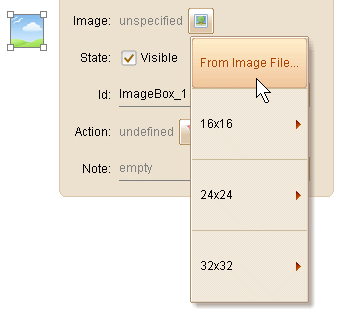
This version also include a slight enhancement: move the “From Image File…” menu item to top when choosing image. This is requested by Ulrich and we think it is reasonable: moving cursor to the bottom may trigger the icon libraries dispaly one by one, which is annoying.
ForeUI V2.10 is released today! From this version ForeUI supports keyboard event handling, it is very useful feature when making prototype for game or other applications that need to manipulate with keyboard. This version also provides enhanced Text element and more (details below).
Keyboard Event Handling
In order to support keyboard event handling, we implemented a new “Key Down” event. It is a basic event and can be handled in any element or page. Usually we need to check the state of certan keys in the “Key Down” event handler, so the new system global properties are provided:
- Current_Key_Code: The key code of current pressed key. Here’s a key code table.
- Ctrl_Key_State: Value will be 1 if the CTRL key is currently pressed, otherwise 0.
- Alt_Key_State: Value will be 1 if the ALT key is currently pressed, otherwise 0.
- Shift_Key_State: Value will be 1 if the SHIFT key is currently pressed, otherwise 0.
- Focused_Element_Id: The id of element that currently has input focus.
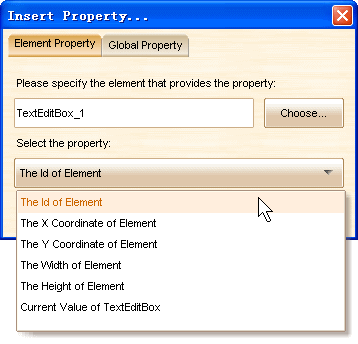
Also we can retrive the Id of the element as an element property, thus we can detect if the element has focus by comparing its id and the Focused_Element_Id system global property.
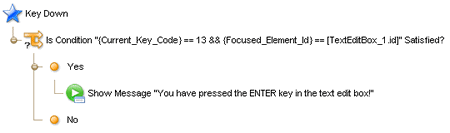
Here is a simple example, a message box will popup when we press the ENTER key within the text edit box. It can be used when we need to simulate the data submit process.
Enhanced Text Element
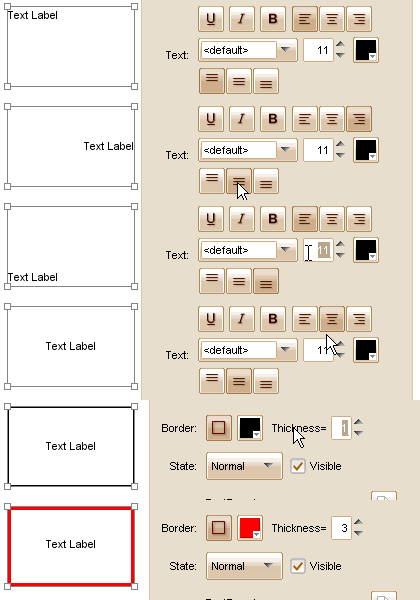
Text element is very frequently used in creating mockup / prototype. In this version we enhance the Text element so that it can have a border and can align text vertically. The animation below shows the details:
Export Image / DHTML via Command Line
This is a very exciting feature! It makes things easy if we want to integrate ForeUI with other tools. From now on, you can invoke ForeUI to export image or DHTML with a single command. Here is the how-to:
Export Images:
executable plotFilePath -Export:Image -Format:JPG -Pages:1,3,5 -FileNamePrefix:Img -NamingWith:Index targetDirectoryPath
The executable will be “launch.bat” in Windows, “sh launch.sh” in other platforms.
The parameters in red are required, parameters in green are optional.
ForeUI will use the value below if the optional parameters are omitted:
- -Format: PNG
- -Pages: <all pages that are not excluded>
- -FileNamePrefix: <same with the plot file name>
- -NamingWith: Index
Export DHTML:
executable plotFilePath -Export:DHTML targetDirectoryPath
All parameters are required.
Other Enhancements:
- Switch page in simulation, do not hide current page if the target page does not exist.
- Shows multiple menu items to launch action editor if right click on multiple elements.
- Make text content in Table element unselectable for FF, Chrome and Opera.
- Tool windows can be resized.
- Allow reseting all parameters in settings window.
- Allow renaming custom event.
Bug Fixings:
- Bug_0139: Single row Table with header cause error in simulation.
- Bug_0140: The “Auto resize element after editing its content” option does not take effect when adding image into button.
- Bug_0141: Copying page allocates duplicated element ids.
- Bug_0143: Copy element that contains “Switch Page” action and paste it to new plot, the new plot will contain the old plot data.
- Bug_0144: Mutirow, encrypt text edit box can not be properly auto resized.
- Bug_0145: The tree view in page management window may become too narrow if any page has a long title.